cloud9factor
New member
- Joined
- Oct 30, 2018
- Messages
- 93
- Points
- 0

Hello everyone, cloud9factor here.
This tutorial is to show you how you can invite your Spotify account to a Family Plan and how to find the adress and zip code so you wont get kicked off.
Its pretty easy and straightfoward. Just follow the steps. But first you need to find a Spotify Premium Family Plan with available invites.
To help in that area I'm going to be giving 400 Spotify Premium Family Plan accounts, so that way you can test it out yourself.
All tools used in this tutorial are available to download at the end with correspondent Virus Total scan
I hope you learn something new and enjoy the reading. :smart:
TUTORIAL
[hide]For this tutorial we are going to use one main tool: 'Charles' and his crack!
Charles is an HTTP proxy / HTTP monitor / Reverse Proxy that enables a developer to view all of the HTTP and SSL / HTTPS traffic between their machine and the Internet.
Its using this Charles that we are going to be able to get the adress and zip code from the main Family Plan account!
So, for you to better understand im going to divide this tutorial in parts!
LETS DO THIS! :hype:
Part 1 - How to Install 'Charles'
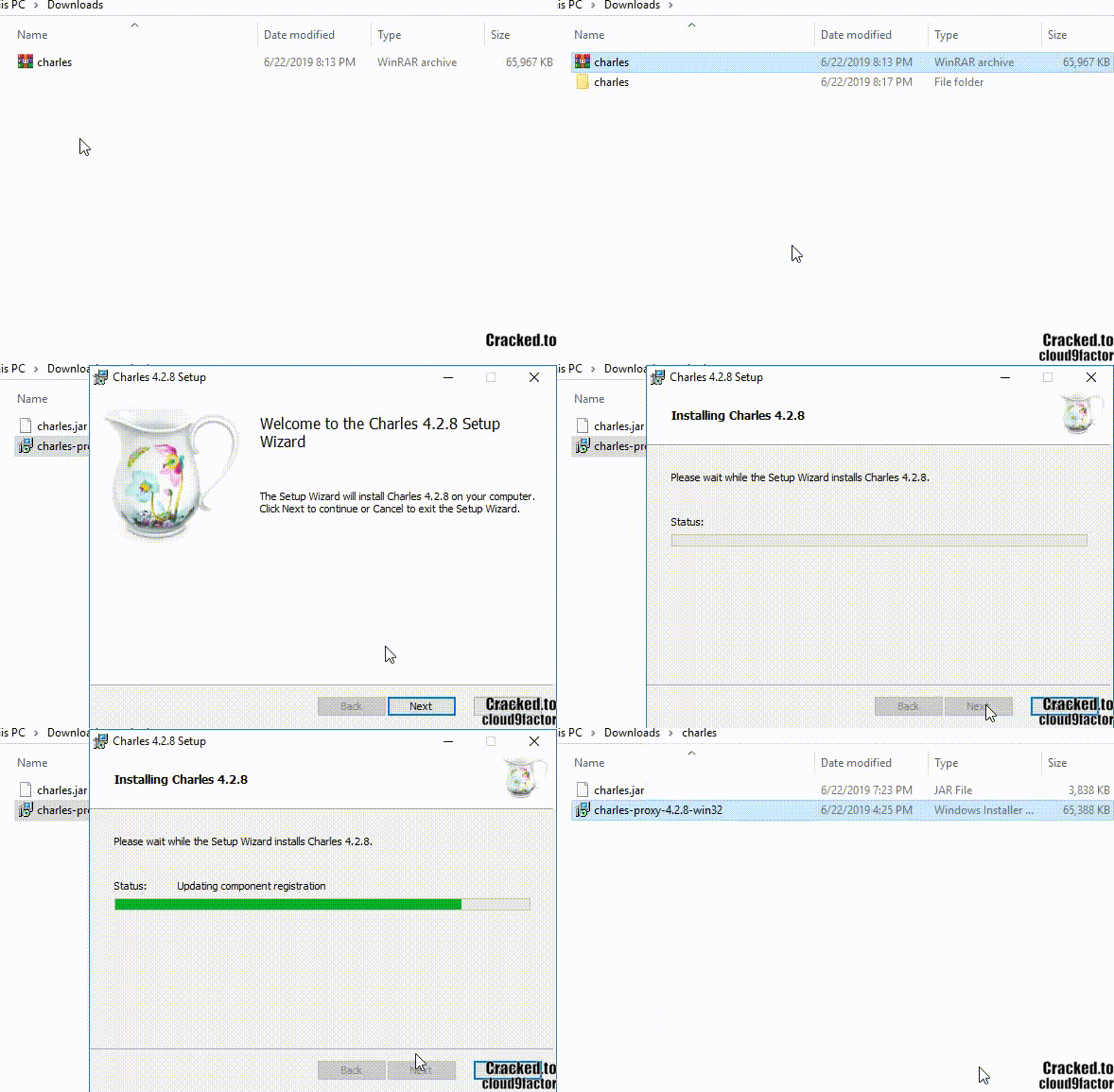
Pretty straight foward! Just download the winrar link at the bottom of the page.
Extract the winrar and install the exe file.
I made the gif just to avoid the super newbies from asking question :kek:
Part 2 - Installing Charles Crack!
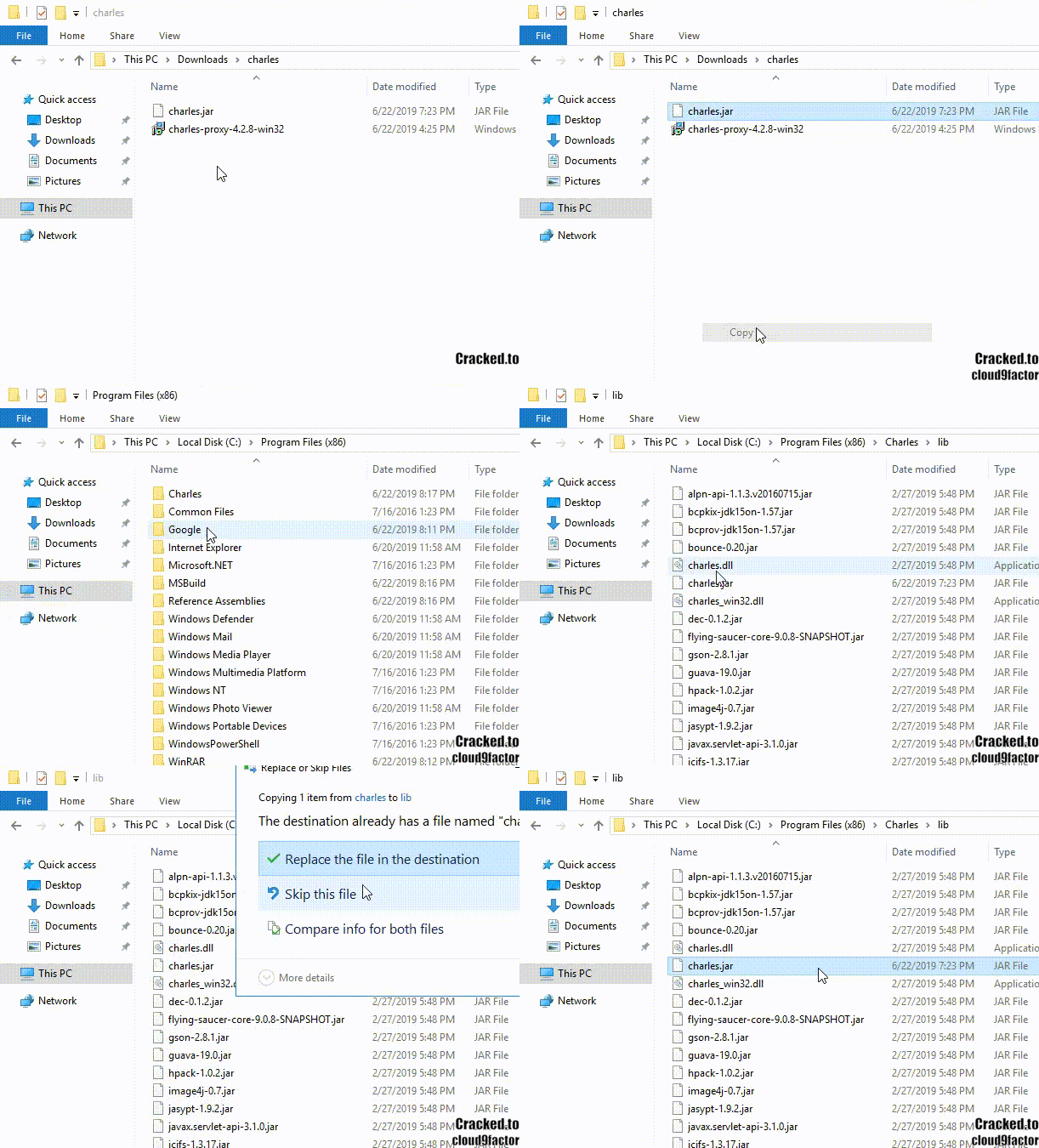
In this part you are going to copy and paste the charles.jar file, from the winrar file you downloaded, to the lib folder where the Charles is installed.
You NEED TO DO THIS! Otherwise we wont be able to see the adress and zipcode from the account.
Usually the folder is located at : C:\Program Files (x86)\Charles\lib
Also pretty easy. Just follow the gif below.
PART 3 - Installing Charles Root Certificate
You have to do this part because if you dont, when you start 'Charles' you will not be able to acess Spotify cause the site will block you!
So if you get a ERROR saying that you cant acess the site its probably because you did not do this part.
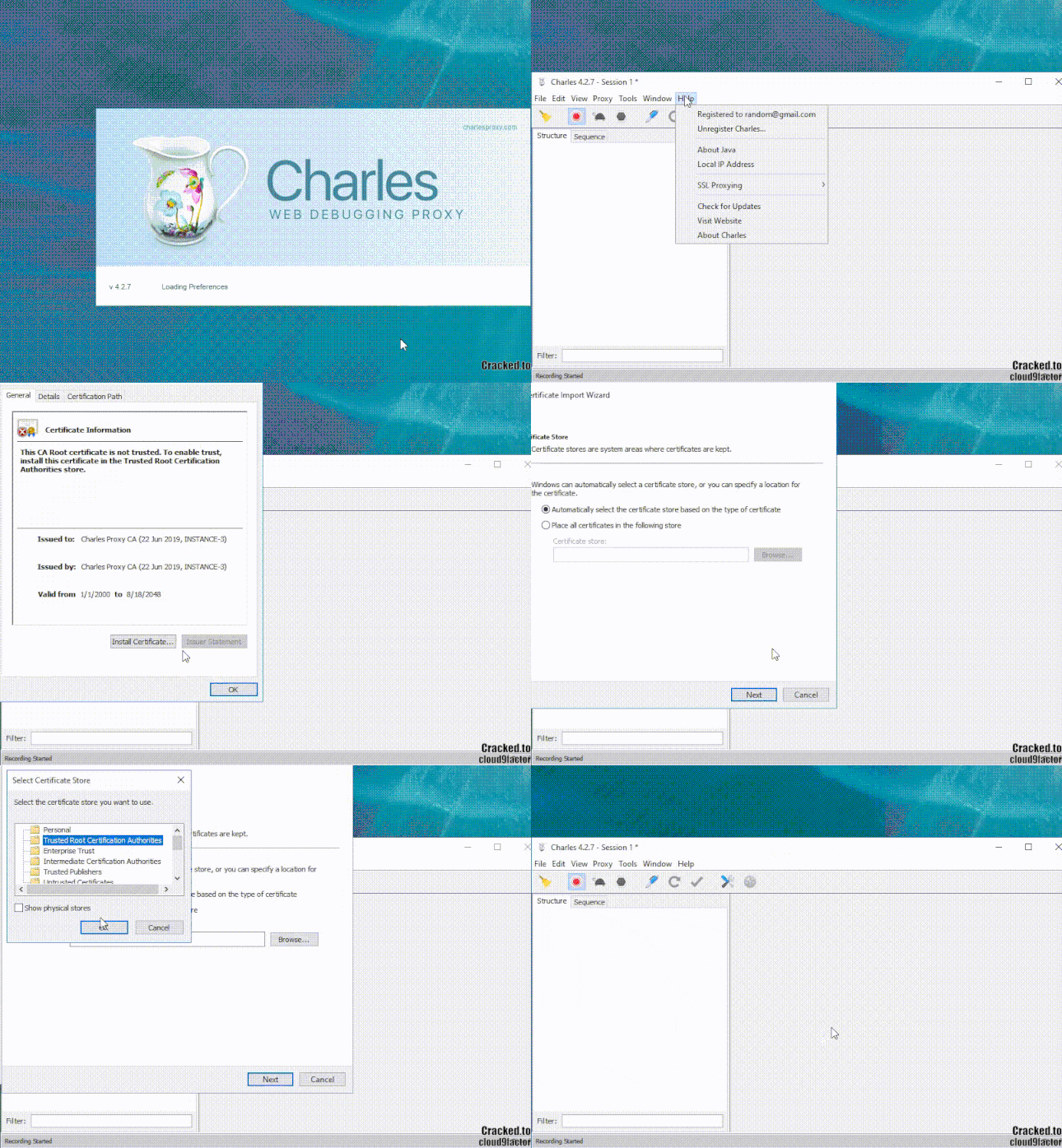
Step 1: Open 'Charles', go to Help and inside of 'SSL Proxying' click on "Install Charles Root Certificate"
Step 2: Click on "Install Certificate..." and choose "Local Machine"
Step 3: Change to "Place all certificates in the following store" and when you browse choose "Trusted Root Certification Authorities"
Step 4: Finish!
PART 4 - Enable SSL on Spotify
However, after you installed the ROOT Certification on yourr computer you still have to Enable the SSL on the Spotify website.
PAY ATTENTION IN THIS one cause you need to enter the Spotify website with the 'Charles' online, turn it off and then turn it on again!

Step 1: After root certification, turn on the Charles if it wasnt online and acess the Spotify website
Step 2: Then go to the 'Charles' and look for the following structure "www.spotify.com" in the Charles application
Step 3: Click it right mouse and choose "Enable SSL Proxying"
Step 4: TURN OFF THE CHARLES! You can clean it or not. TURN THE CHARLES BACK ON!
Step 5: Go back to Spotify and login on the Spotify Account with Family Plan and available invites
Step 6: After you are logged in, get back to Charles and you are going to see that the structure "www.spotify.com" is now blue! That means you did everything right!
PART 5 - Sending the Invite Code to your email!
This part is pretty easy, BUT REALLY IMPORTANT! Cause its this part that is going to give us the ADRESS AND ZIP CODE! You have to do this part with Charles RUNNING!
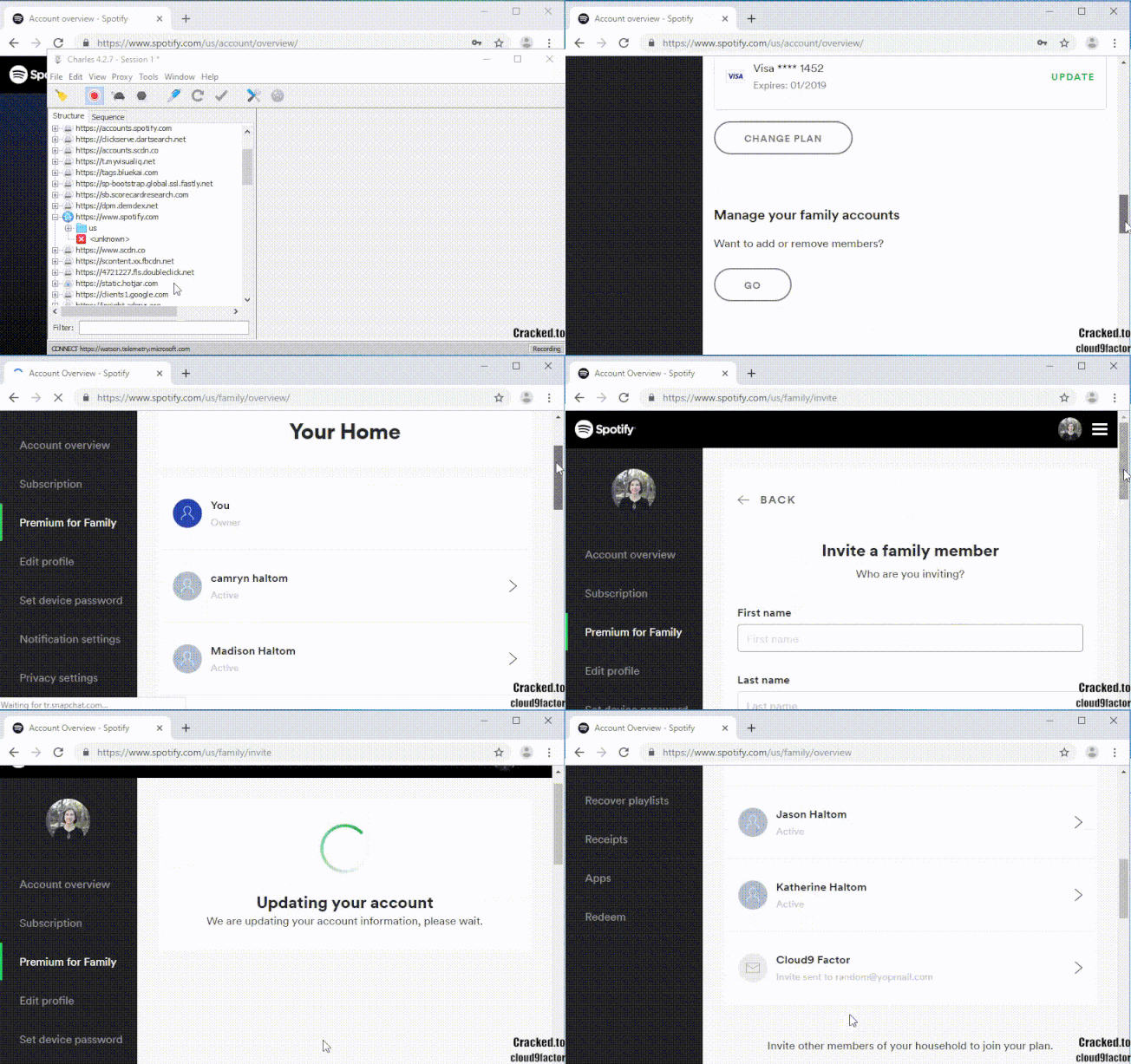
You will go "Manage your Family Accounts", click in "Go" and send an invite to someone. YOU HAVE TO SEND AN INVITE TO SOMEONE TO GET THE ADRESS! If you cant see this part that probably means the account doesnt have available invites.
TIP: Go through the 400 accounts i provided below and see if there is a Family Plan with invites available. When you get an account with invites available, do this tutorial.
Link: https://anonfiles.com/M0Lapaw4n3/PREMIUM_FOR_FAMILY_rar
Im going to put this link here with the account so that only people that read the tutorial use it to test it out. Its password protected and the pass is: cloud9factorcracked.to
PART 6 - How to get the ADRESS AND ZIP CODE
After you sent you the invite you have to go back to Charles and see email as the gif shows

Step 1: Go back to Charles and in the structure "www.spotify.com" that has a blue ball on the side
Step 2: Follow the folders: us > family > api > get-family-plan
Step 3: After you get to 'get-family-plan' you need to click on the '/ ' file
Step 4: Then you click the tab "Contents"
Step 5: You will find the Adress and Zip Code on the JSON TEXT. Linel is the Street Name!
PART 7 - Using your Spotify Premium Account
This part will show you sign up to the Family Plan and use your account!
If there is not a number for the Street you can use 'rd', that means 'road'.

DOWNLOAD LINKS!
[hide]1 - 'Charles' and his crack
LINK: https://anonfiles.com/M6I6pfwfn4/charles_rar
VT: https://www.virustotal.com/gui/file...1aa373f1d9da93c2a1b0c6a12d7e03e61ff/detection
[/hide]
[font=roboto, sans-serif][font=Roboto, sans-serif]Please leave a [/font][/font][font=roboto, sans-serif][font=Roboto, sans-serif]LIKE[/font][/font][font=roboto, sans-serif][font=Roboto, sans-serif]! :fiesta: Dont be a LEECHER![/font][/font]
